
Meetings are only useful when something happens afterward. Unfortunately, people leave a room with different memories of what was decided. A short follow-up email after a meeting fixes that problem. It confirms decisions, lists who will do what and keeps the project moving. As a result, fewer tasks slip and fewer questions come up later.
This guide explains when to send the email, what to include and gives you five templates for internal meetings, client meetings and one-on-ones. It also covers subject lines, timing and common mistakes.
Why a follow-up email after a meeting matters
- It creates a written record. If someone disagrees later, you can point to the summary.
- It clarifies ownership. People are more likely to act when their name and date appear in writing.
- It helps absent colleagues. Anyone who missed the meeting can catch up in two minutes.
- It shows professionalism. Clients and managers notice who follows through.
When to send it
Send the email within 24 hours, and ideally within a few hours while the discussion is fresh. If the meeting included important decisions, send it the same day. However, if you need input from the group before you finalize, send a draft and ask people to reply by a set time.
The four-part recipe
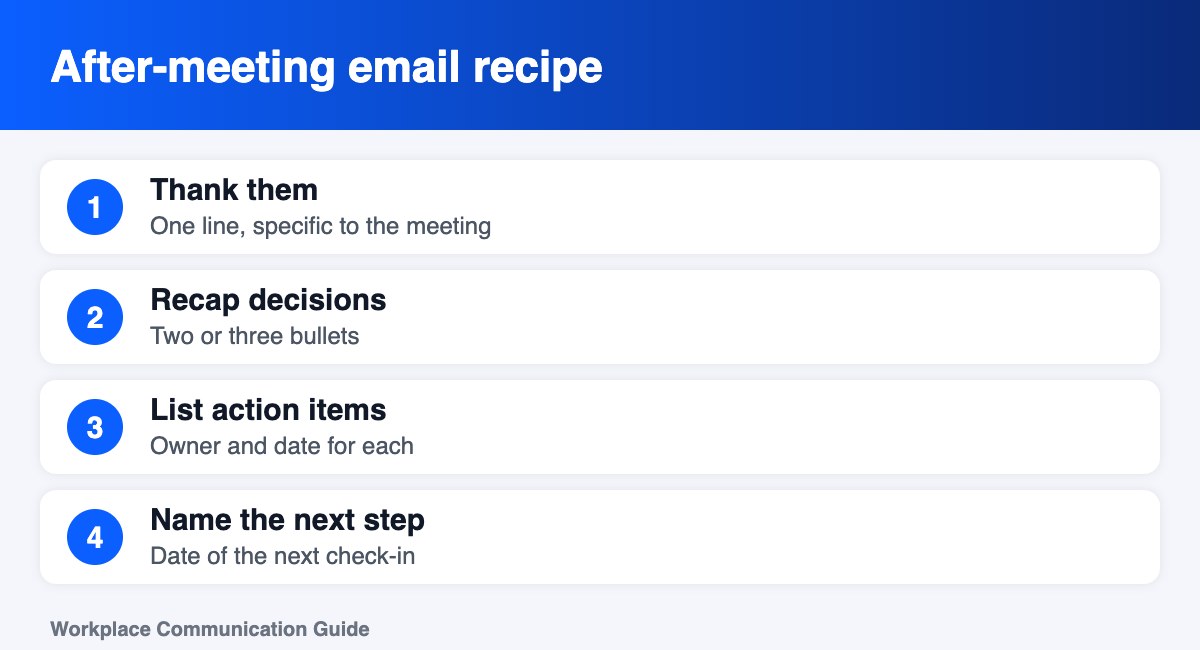
1. A brief thank-you
Start with one sentence that thanks people for their time and mentions the topic. For example, “Thank you for joining today’s planning meeting.”
2. A recap of decisions
List the key decisions in two or three bullets. Because readers skim, keep each bullet to one line.
3. Action items with owners and dates
Write who will do what and by when. Specific wording such as “Jordan will send the creative brief by Friday” works better than “We will send the brief soon.”
4. The next step
End with the date of the next meeting or check-in, and invite corrections: “Please reply if I missed anything.”
Follow-up email templates after a meeting
Template 1: Internal team meeting
Subject: Notes and next steps: Spring campaign planning
Hi team,
Thank you for joining today’s planning meeting. Here is a quick recap.
Decisions:
– Launch date: March 4
– Budget cap: $8,000
Action items:
– Jordan: send the creative brief by Friday
– Sam: confirm vendors by Monday
Next check-in: Tuesday, 10:00. Please reply if I missed anything.
Best,
Maria
Template 2: Client meeting
Subject: Summary of today’s meeting and next steps
Dear Ms. Patel,
Thank you for meeting with us today. We appreciated your feedback on the draft.
To confirm, we agreed that we will deliver the revised proposal by Thursday, and you will share the budget approval by the following Monday. Please let me know if any detail needs to change.
Best regards,
Jordan Lee
Template 3: One-on-one with your manager
Subject: Recap: our one-on-one
Hi Maria,
Thanks for the time today. As discussed, I will lead the Q1 launch, and we will review progress on February 15. I will also send a draft development plan by next Friday.
Please tell me if I missed anything.
Thanks,
Jordan
Template 4: Networking or informational meeting
Subject: Thank you for your time today
Hi Mr. Rivera,
Thank you for taking the time to speak with me about your career path. Your advice about building a portfolio was especially helpful, and I will start on it this week. I would be glad to share my progress in a month if you are open to it.
Best,
Jordan
Template 5: When nothing was decided
Subject: Open questions from today’s meeting
Hi all,
Thank you for the discussion. We did not settle the launch date, so here are the two options. Please reply with your preference by Wednesday, and I will confirm.
Best,
Maria
Subject lines that work
- Notes and next steps: [meeting topic]
- Recap: [meeting name]
- Summary and action items: [project]
- Following up on today’s meeting
- Decisions from [date] meeting
Common mistakes
- Sending it too late. After two days, people forget the details.
- Writing a long essay. Keep it under 200 words when you can.
- Leaving out owners. A task without a name rarely gets done.
- Forgetting to invite corrections. A short invitation prevents disagreement later.
Frequently asked questions
Who should send the follow-up email?
The meeting organizer usually sends it, but anyone can offer. In small teams, the note-taker is a good choice.
Should I copy my manager?
Copy them when decisions affect their work or budget. Otherwise, send it to attendees only.
What if the notes contain sensitive information?
Share only what attendees need to know, and avoid personal comments. When in doubt, ask your manager first.
To write the summary well, review our guides to professional email format, a simple meeting agenda template and how to end a professional email.
In short, a follow-up email after a meeting keeps everyone aligned. Send it quickly, keep it brief and make each action item specific. Therefore, the next meeting can start with progress instead of confusion.
Tips to make your follow-up email after a meeting stronger
- Take notes during the meeting, so the recap is accurate and quick to write.
- Use bullet points, because they are easier to scan than long paragraphs.
- Bold the dates, so owners can find their deadlines at a glance.
- Keep the tone friendly but direct, especially with people outside your team.
- Save a template, so you can send a summary in two minutes after every meeting.
In addition, consider how your message looks on a phone. Many people read follow-up emails between meetings, so short lines, clear headings and one main request per message help them respond quickly. Finally, if a colleague replies with a correction, thank them and send an updated version, because an accurate record is more valuable than a perfect first draft.
Over time, a consistent follow-up habit builds your reputation as someone who is organized and reliable. Colleagues start to expect your recap, and meetings become more productive because everyone knows the summary will arrive. That small routine often matters more than any single email you write.
